TweetDeck is your personal browser for staying in touch with what’s happening now, connecting you with your contacts across Twitter, Facebook, MySpace, Buzz and more.
TweetDeck shows you everything you want to see at once, so you can stay organised and up to date.
Some of the important features of
TweetDeck are:
- Update Twitter, Facebook, Buzz and MySpace in a click
- Manage conversations with @replies and direct messages
- Stay organized with Groups
- Manage multiple Twitter accounts easily
Hurry up to download
TweetDeck. It’s free.
ManageFlitter is an easy to use Twitter follower management tool and in my opinion is the best among its competitors. If you want to clean up those twitter accounts who are not following you back, its a breeze at ManageFlitter. All you have to do is to locate the expendable overview.
Once you have found it, just drag your mouse across the avatars of accounts to select them for unfollowing and click the unfollow option (upper right corner). I have included a screenshot for your convenience. It's really a great free tool that makes it easy to get rid of the spam crap that always creeps back in.
Are you in search of results of the
Secondary School Certificate (SSC, Matric) Peshawar Board? Simply click
here to find online result.

If you are interested in finding the Yearly Salat (Namaz) times of Pakistan's Cities or their Qibla direction, simply click
here.
P.S.: All salat times are calculated according to
Fiqh Hanfi and are verified against the US Naval Observatory's data.
Are you fed up with your blog’s template hosted on Blogger? But you are afraid that you will loss your widgets or even worse mess up all the settings of your blog. Don’t worry, this tutorial is for you. It will guide you step by step, how to change your blog’s template safely.
In fact changing your blog’s template on Blogger is very easy, all you have to do is to make sure you follow these 7 steps:
Step #1. Log in to your Blogger account. This will take you to Dashboard.
Step #2. Click
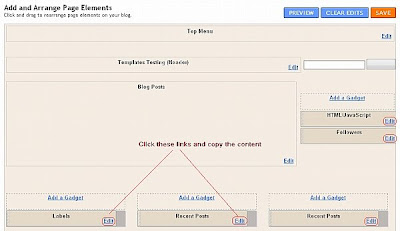
“Layout” link of the blog for which you want to change the template. This will take you to the page shown below.
Step #3. Next click on the
“Edit” link on the widgets and back up their contents in note pad. This step is very important because during the changing of template process these widgets will be lost. So it is a good practice to save them at this stage.
Step #4. Click on the
“Edit HTML” link in the top menu, Blogger will take you to the screen shown below.
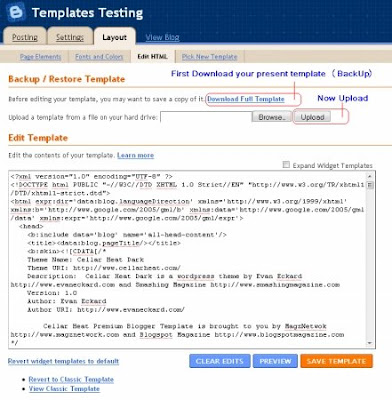
Step #5. Now is the time to download the existing template. This will make restoring the existing template easier, in case some thing went wrong during changing the template. Click "
Download Template" and follow the instructions to save a copy of the template.
Step #6. Click browse and select the template from your PC which you want to upload and click
“Upload”. In case a message is displayed asking you to confirm to remove any widget, select
“Remove”. After uploading the template click
“Save”.
Step #7. Add widgets which you have saved in notepad file one by one and start using your newly uploaded template.
If you are new to blogging and you are planning to start your own blog, I would suggest you to sign up for an account at Blogger. Blogging at Blogger is easy and fun to do. Blogger has some great features and above all it is free. So you have nothing to lose. To start a blog at Blogger, follow following four easy steps, which can easily be completed within a couple of minutes.
Here’s a detailed step-by-step guide to help you to get started:
Step #1: Go to
Blogger and click “CREATE YOUR BLOG NOW” option near bottom right corner of the page.

Step #2: You will be asked to create a user name and choose a password that you will require to access your Blogger account. Type a display name that will be used to sign your posts and provide an email
address. Blogger accepts other email addresses besides Google/Gmail ones.
Don’t forget to check the box that say you accept Blogger’s Terms of
Service and click “CONTINUE” to go to the next screen.

Step #3: Give a descriptive title and web address to your blog. It will be better if you use relevant keyword phrases in your blog’s title and its web address. It will help in search engine optimization and you will be able to get a relatively higher page rank in searches. Click “CONTINUE” to go to next window.

Step #4: You are required to select a template for your blog. This is the style and look of your blog. Blogger already has some preset designs that you can use. Select a template and click “CONTINUE”.

Your new blog is created and is ready for posting. Click on “Start Posting” to write your first post for the world to see. After you have finished writing your first post, click on “Publish post”. Within a few seconds Blogger will tell you that it has published your post and you have officially joined blogger’s community.
If you are new to blogging and want to know more about it, read my post “
What is a Blog / Weblog?”
// Image Credits:
Vance’s Homestead
You might be thinking, it is April 2010, blog (a contraction of the term weblog) and blogging have become a buzz word. Every body knows about it. What is the point of posting a post about
What is a Blog?
You are right, if you are thinking in this way. But, it is also a fact that there are people even now, who don’t know much about
Blogs and
Blogging. They have just heard its name and they want to start their own blog. This post is aimed at people like these and to help them start a blog of their own.
So let us come back to the topic of this post, what is a blog? I could answer it in many ways but the best way is to see what experts are saying about blogs and blogging:
“A weblog is a hierarchy of text, images, media objects and data, arranged chronologically, that can be viewed in an HTML browser.”
Harvard Law
“A blog is a type of website, usually maintained by an individual with regular entries of commentary, descriptions of events, or other material such as graphics or video. Entries are commonly displayed in reverse-chronological order”.
Wikipedia
“A blog is a personal diary. A daily pulpit. A collaborative space. A political soapbox. A breaking-news outlet. A collection of links. Your own private thoughts. Memos to the world.”
Blogger
In a nutshell, a blog is website, where you post your entries in reverse chronological order. Readers of the blog visit your blog posts and they comment on your posts, if they wished so.
Now you have understood what a blog is, the next step before starting a blog is to select your niche (thematic topic of your blog). I would suggest you to select a niche (the more narrow your niche, the better), for which you have a passion. This will keep your interest in the blogging and secondly you will have enough motivation to update your knowledge about your niche a write a quality post.
Once you have selected your niche, it is time to opt a blogging platform. I would recommend you to go to Blogger and start your blog. It has a better platform and besides, it is a free service.
If you have difficulty in starting a blog at blogger, see my next post about step by step tutorial on
“How to Start a Blog at Blogger”.
If you have your own working definition of a blog or you want to comment on my post “
What is a Blog/Weblog?”, feel free to post your comment.


 Step #2: You will be asked to create a user name and choose a password that you will require to access your Blogger account. Type a display name that will be used to sign your posts and provide an email


